Workout planner · in development

Your next workout, planned around today.

Pacewoven builds each session from your goal, experience and equipment, the time you have today and what you have logged. It tells you why it chose each workout, and you can change anything before you start.

  • Plans come from fixed rules on your phone, not AI
  • Start without an account
  • Kilograms or pounds

Planned for Android and iOS. In development: not in any app store yet, with no release date or price.

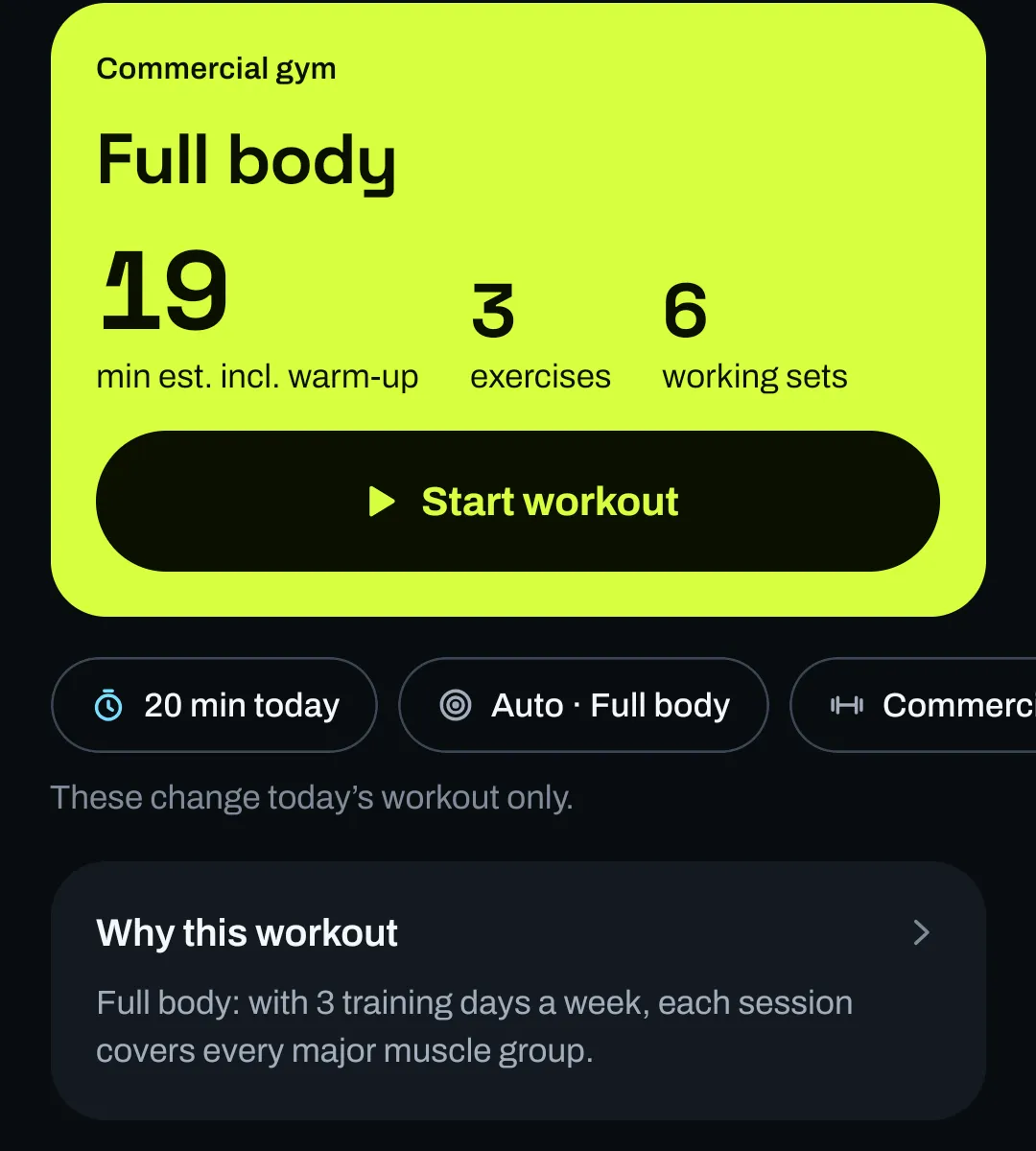
The Workout tab with 20 minutes chosen for today: a lime card reading Commercial gym, Full body, 19 minutes estimated including warm-up, 3 exercises, 6 working sets, and a Start workout button. Below it, chips for 20 min today, Auto Full body and Commercial gym, a Why this workout line, and the first exercise, Goblet Squat, 2 × 8 at 7.5 kg with a starting suggestion.
Real screen · development build, sample data
  1. 20 minutes today The plan was rebuilt to fit: 3 exercises, about 19 minutes with warm-up.
  2. Your gym Only exercises that a commercial gym supports.
  3. A reason “Full body: with 3 training days a week, each session covers every major muscle group.”

How it works

Four steps, and the last one feeds the first.

Setup takes a few answers. After that, every workout you log shapes the next one.

Step 1 of 4

Tell it how you train

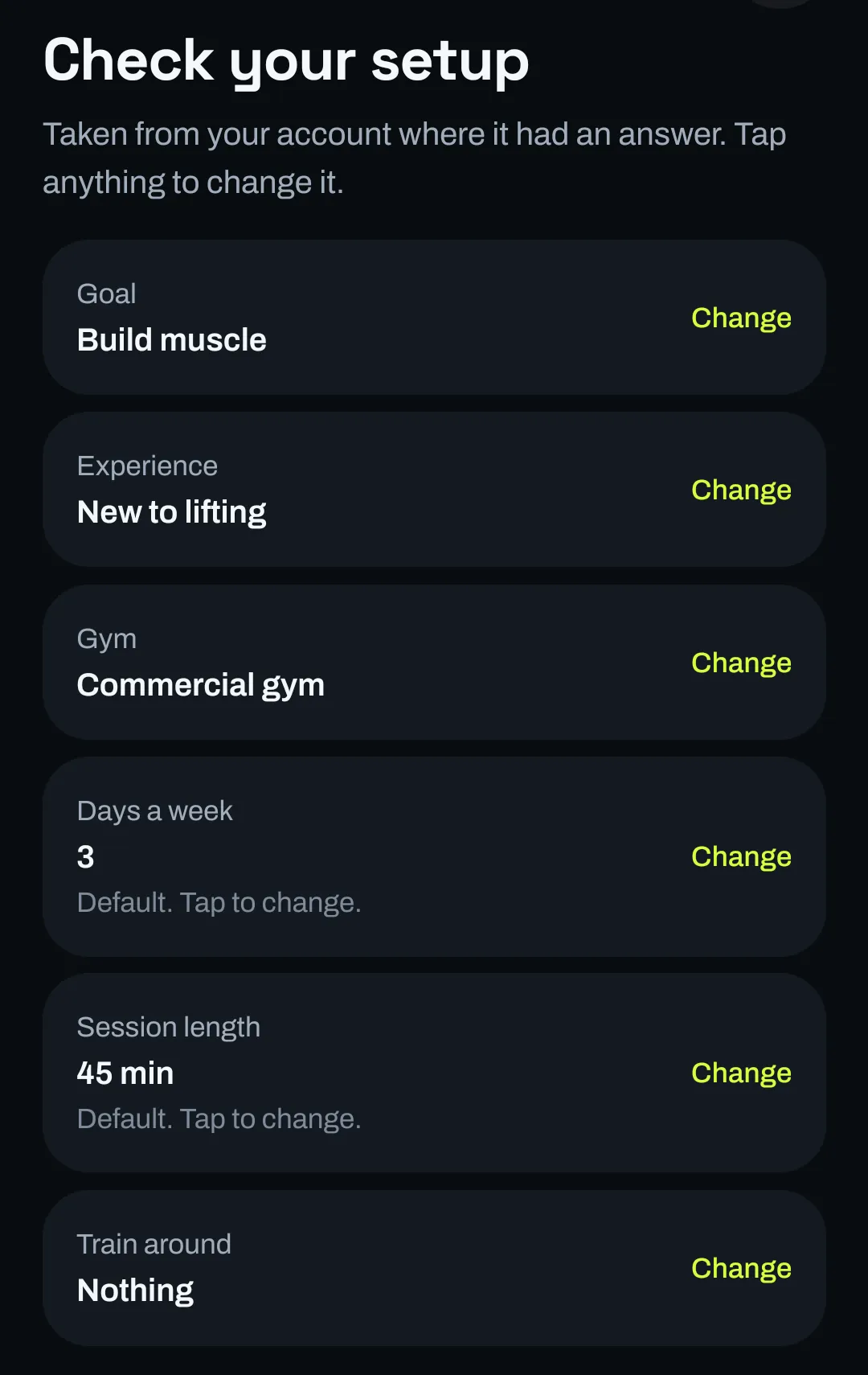
Choose your goal, your experience and the gym you use. Days a week, session length, anything to train around, what you trained recently, and kg or lb are optional: each starts from a stated default you can change later.

The Check your setup screen listing Goal: Build muscle, Experience: New to lifting, Gym: Commercial gym, Days a week: 3, Session length: 45 min, and Train around: Nothing, each with a Change button.
Real screen · development build, sample data

Step 2 of 4

Get a workout for today

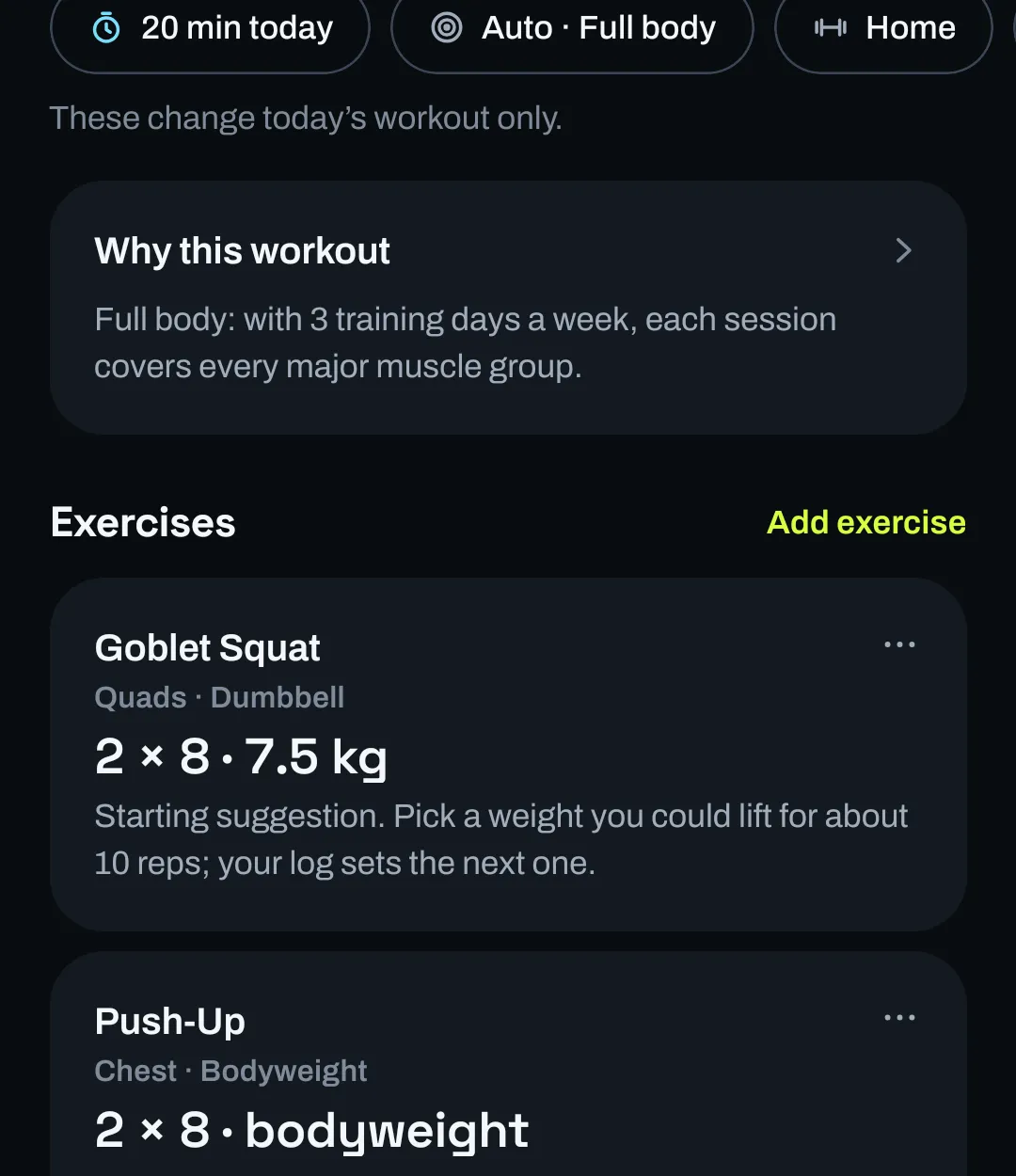
Your phone builds the session from your setup, the minutes you have today and the gym you are in. A one-line reason says why it chose this focus. Change the time or the gym and the workout is rebuilt for today only.

Today’s workout after switching to a Home gym with dumbbells: chips read 20 min today, Auto Full body and Home. A Why this workout line explains the full-body choice, and the exercises are now Goblet Squat with dumbbells and Push-Up with bodyweight.
Real screen · development build, sample data

Step 3 of 4

Adjust it, then log your sets

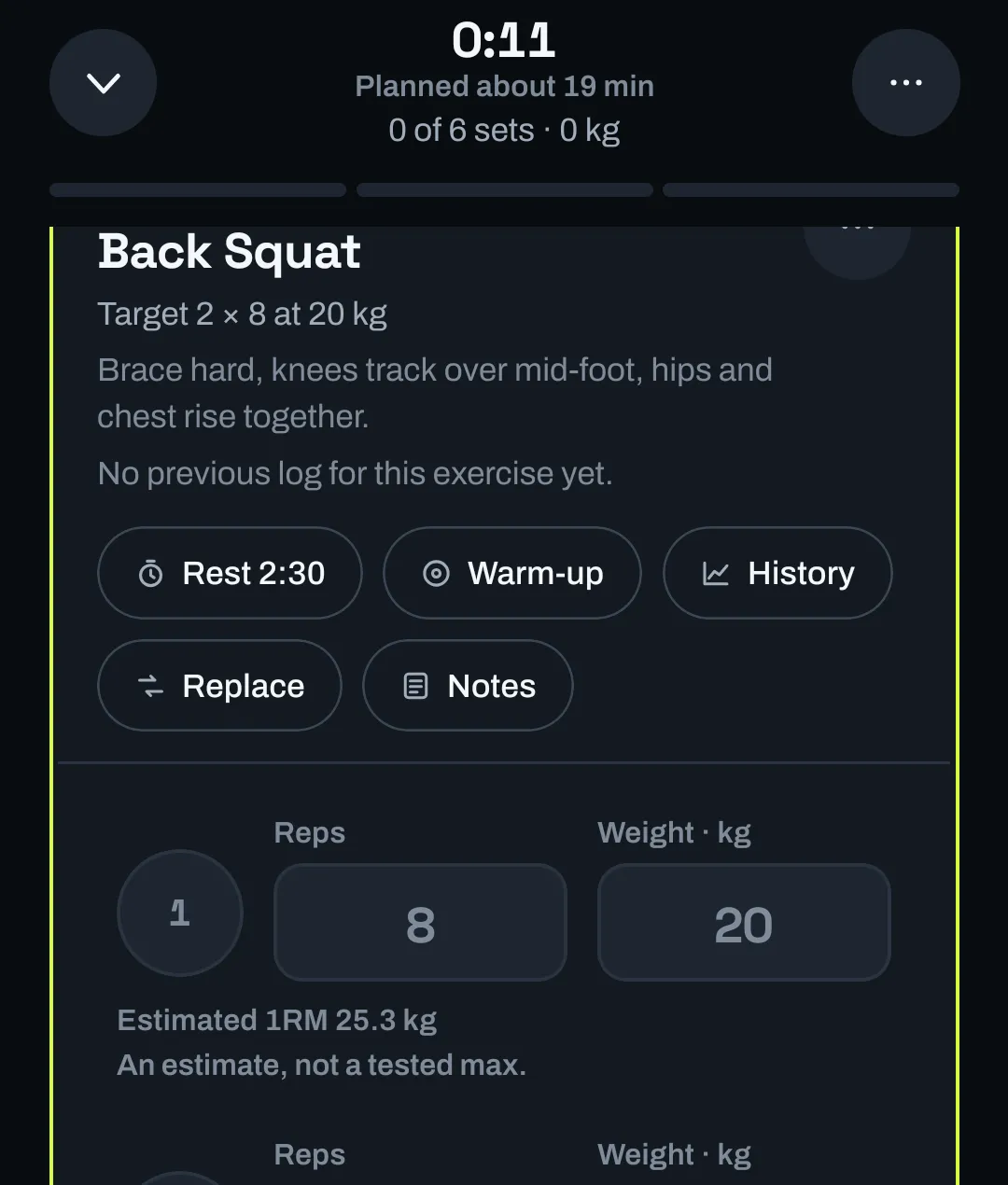
Swap an exercise, add one, or add sets. In the workout each set is reps and weight with one tap to complete it, a rest timer between sets, and an estimated one-rep max next to what you lifted.

The workout logger on Back Squat: target 2 × 8 at 20 kg, a form cue, buttons for Rest, Warm-up, History, Replace and Notes, and a set row with 8 reps and 20 kg, showing Estimated 1RM 25.3 kg, an estimate, not a tested max.
Real screen · development build, sample data

Step 4 of 4

Finish, and the next one builds on it

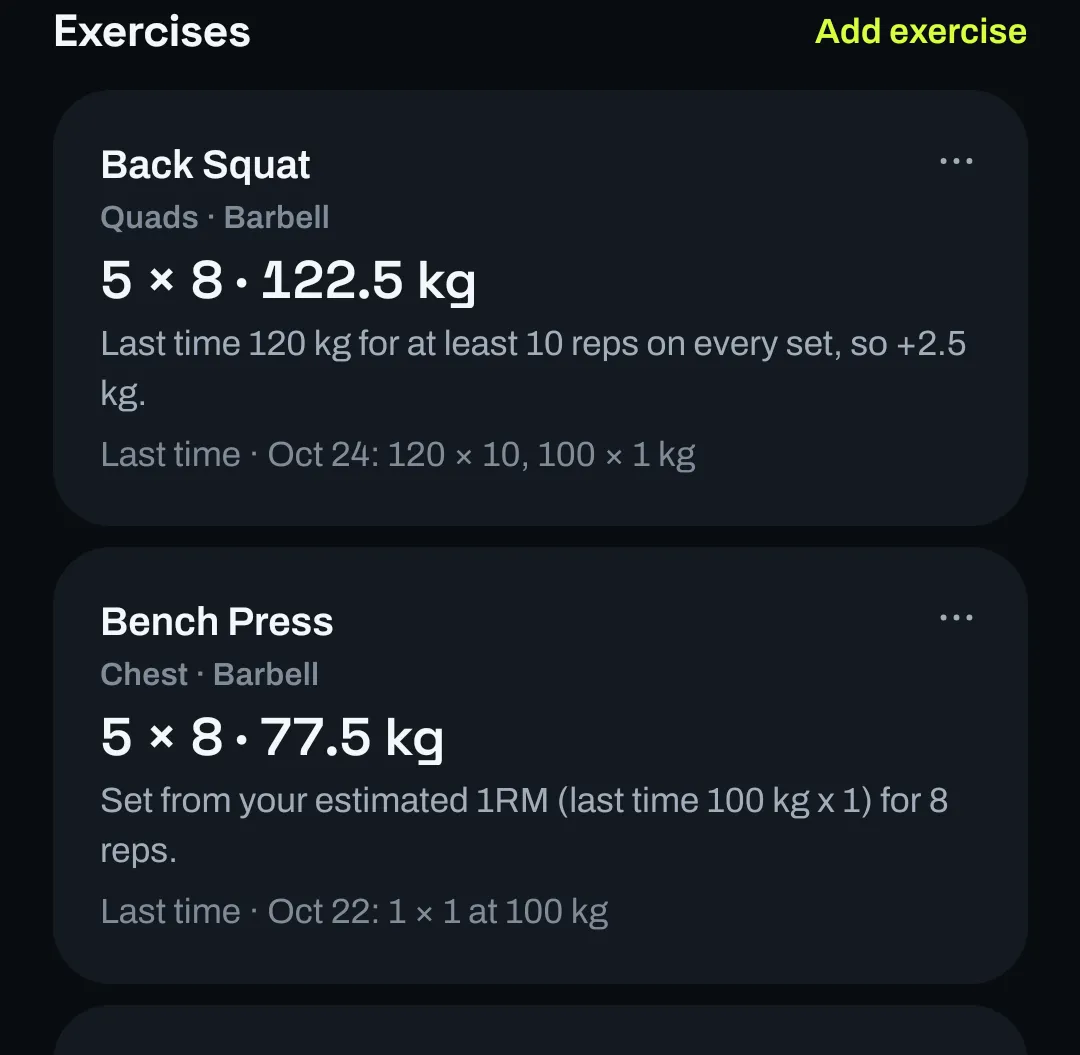
Review and save the workout. The next plan uses it: reach the top of the rep range on every set and the load goes up; otherwise it is set from what you managed last time.

Each workout you log feeds the next one, so step 2 keeps improving.

The next workout after a logged session: Back Squat 5 × 8 at 122.5 kg with the reason “Last time 120 kg for at least 10 reps on every set, so +2.5 kg”, and Bench Press 5 × 8 at 77.5 kg set from the estimated 1RM of the last session.
Real screen · development build, sample data

Workouts that fit

Six things decide today’s workout.

These are the inputs the planner uses. The app explains its choices in plain lines, like the reasons in the screens on this page.

Goal
Build muscle, Get stronger or General fitness sets the rep ranges, sets per muscle and rest.
Experience
Decides how many exercises a session holds and how familiar they are. Spare time goes to more sets of the main lifts.
Equipment
Commercial gym, Home gym, Dumbbells only or No equipment, or your own gyms item by item. Exercises that need a bench, rack or machine you lack are left out.
Time today
Pick the minutes you have. The session is fitted to an estimate that includes warm-up, so a short day means fewer exercises, not a rushed plan.
Your log
Loads come from your last sets. Reach the top of the rep range on every set and the weight goes up. With no history yet, a starting suggestion is clearly labelled.
Recovery
Which muscles your log suggests are most recovered helps decide today’s focus, together with how many days a week you train.

Change anything before you start.

Today’s plan is a starting point, not an order.

  • Change the minutes or the gym for today without touching your setup.
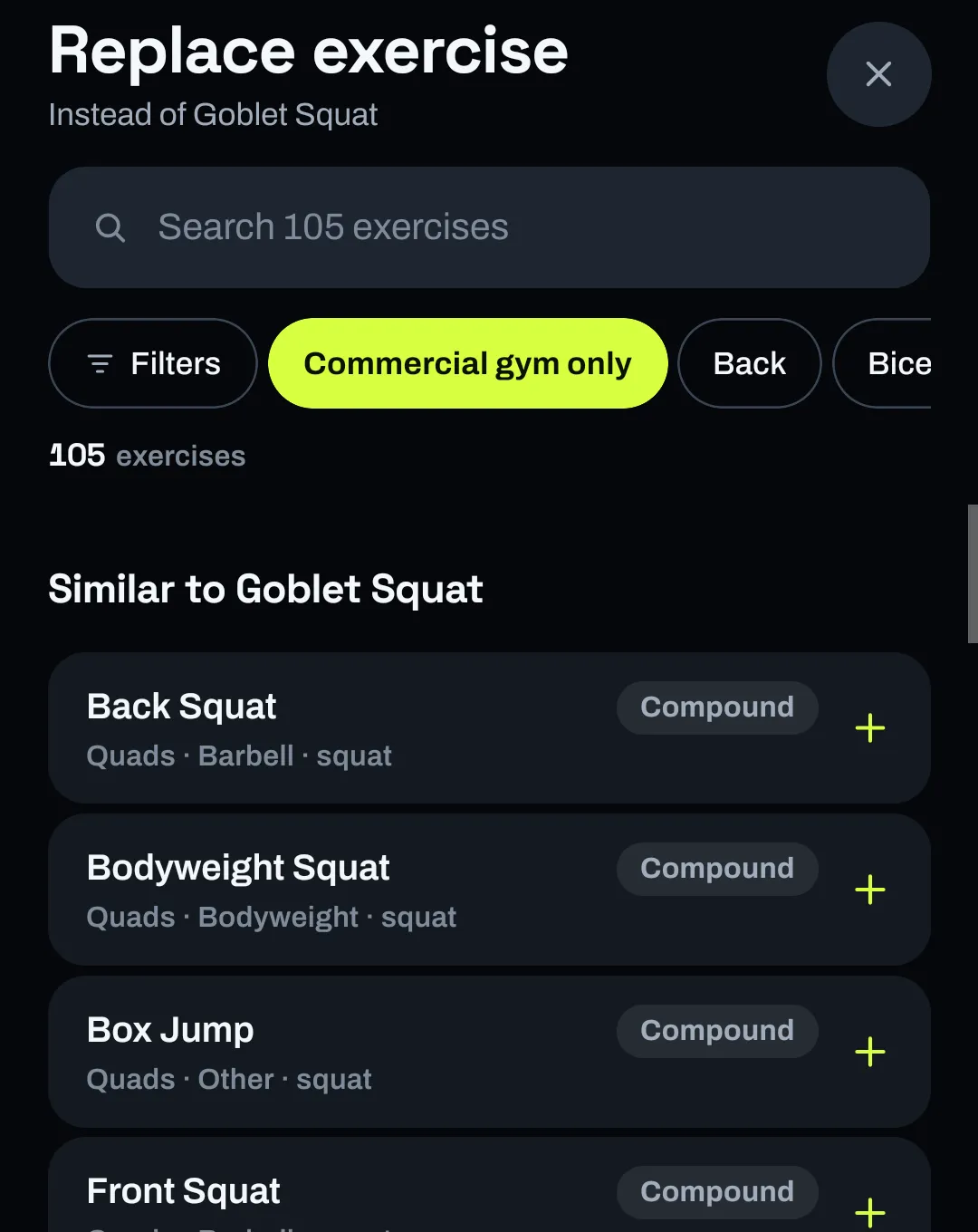
  • Replace an exercise from a ranked list of similar ones that fit your gym, or search the exercise library.
  • Add exercises and sets, or stop an exercise being recommended again.
The Replace exercise screen for Goblet Squat: a search field for 105 exercises, a Commercial gym only filter, and a list of similar compound exercises such as Back Squat, Bodyweight Squat, Box Jump and Front Squat.
Real screen · development build, sample data

Kilograms or pounds, done properly.

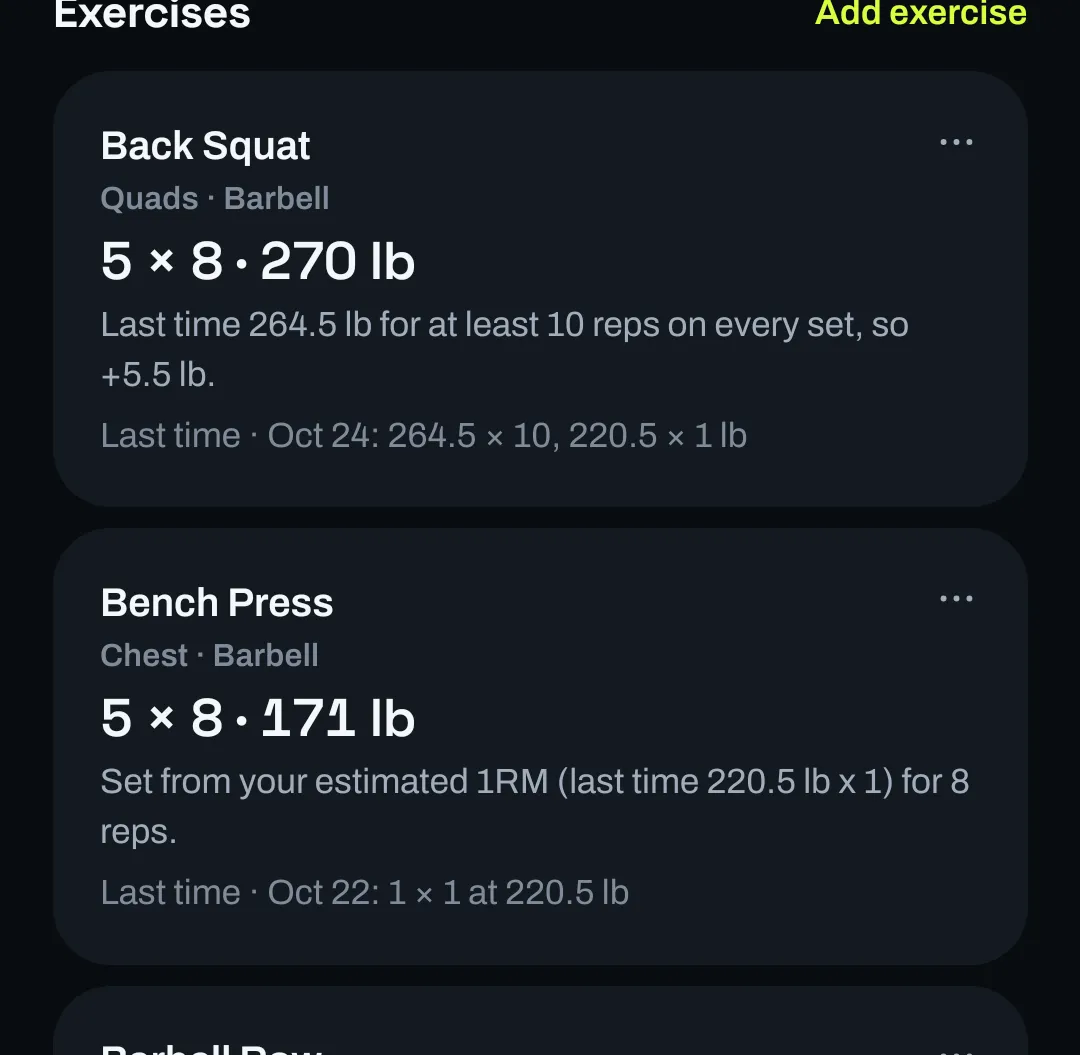
Switch units and the whole plan follows: loads, the reasons behind them, and sensible steps of 2.5 kg or 5 lb with the matching bar weight. Switching back restores your own settings.

The same planned workout shown in pounds: Back Squat 5 × 8 at 270 lb and Bench Press 5 × 8 at 171 lb, with the reasons written in pounds.
Real screen · development build, sample data

Logging and progress

Logging that keeps up with you.

Large numbers, one tap per set, and a record you can trust because you can fix it.

Sets, rest and warm-ups.

  • Reps and weight per set, with an estimated one-rep max shown as an estimate, not a tested max.
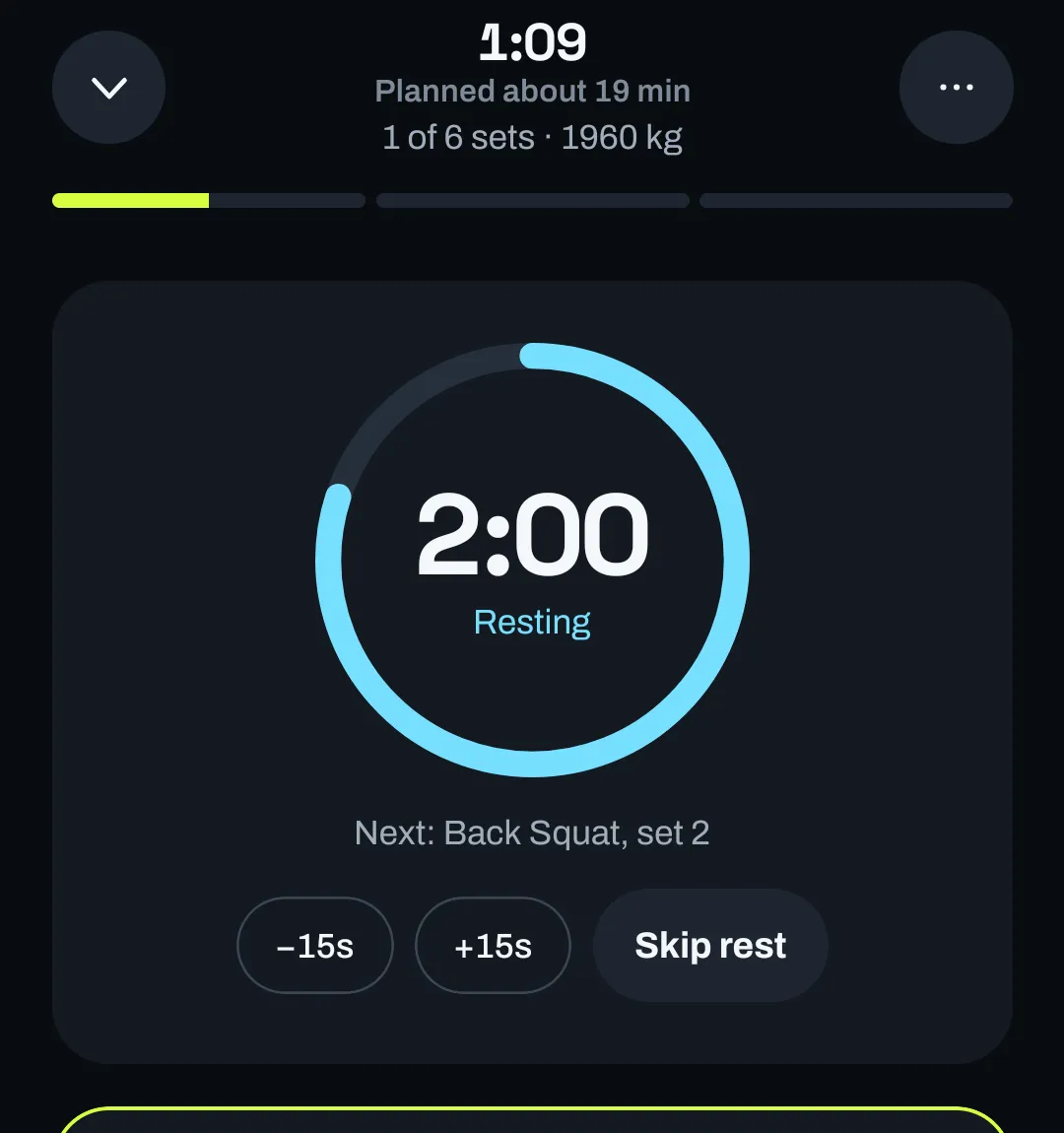
  • A rest timer you can nudge by 15 seconds or skip. It picks up where it was if the app is closed.
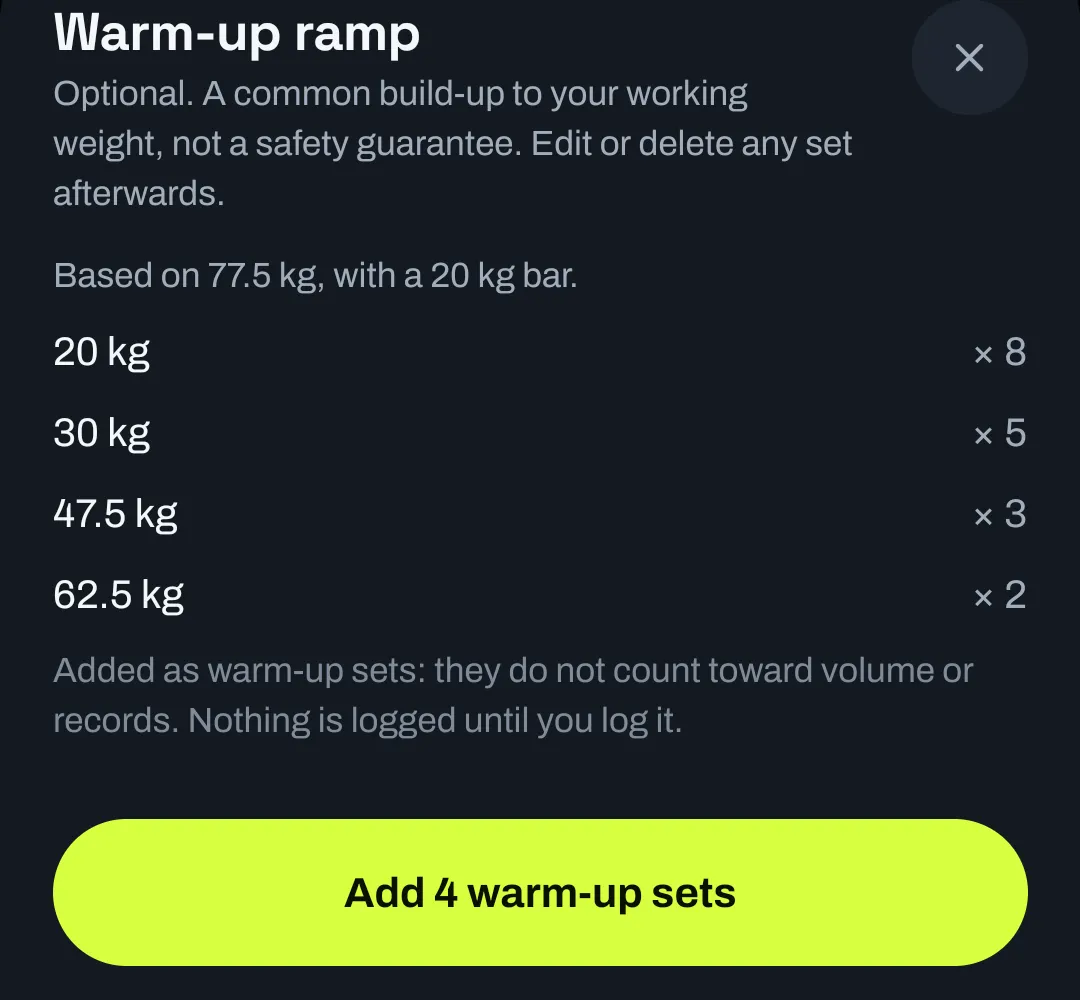
  • An optional warm-up ramp for loaded lifts. Warm-ups are counted separately, never as working sets or records.
The logger during rest: a cyan countdown ring reading 2:00, Resting, Next: Back Squat, set 2, with buttons for minus 15 seconds, plus 15 seconds and Skip rest.
Real screen · development build, sample data
A Warm-up ramp sheet based on 77.5 kg with a 20 kg bar: 20 kg × 8, 30 kg × 5, 47.5 kg × 3, 62.5 kg × 2, noting that warm-up sets do not count toward volume or records, and an Add 4 warm-up sets button.

Finish with a review, not a guess.

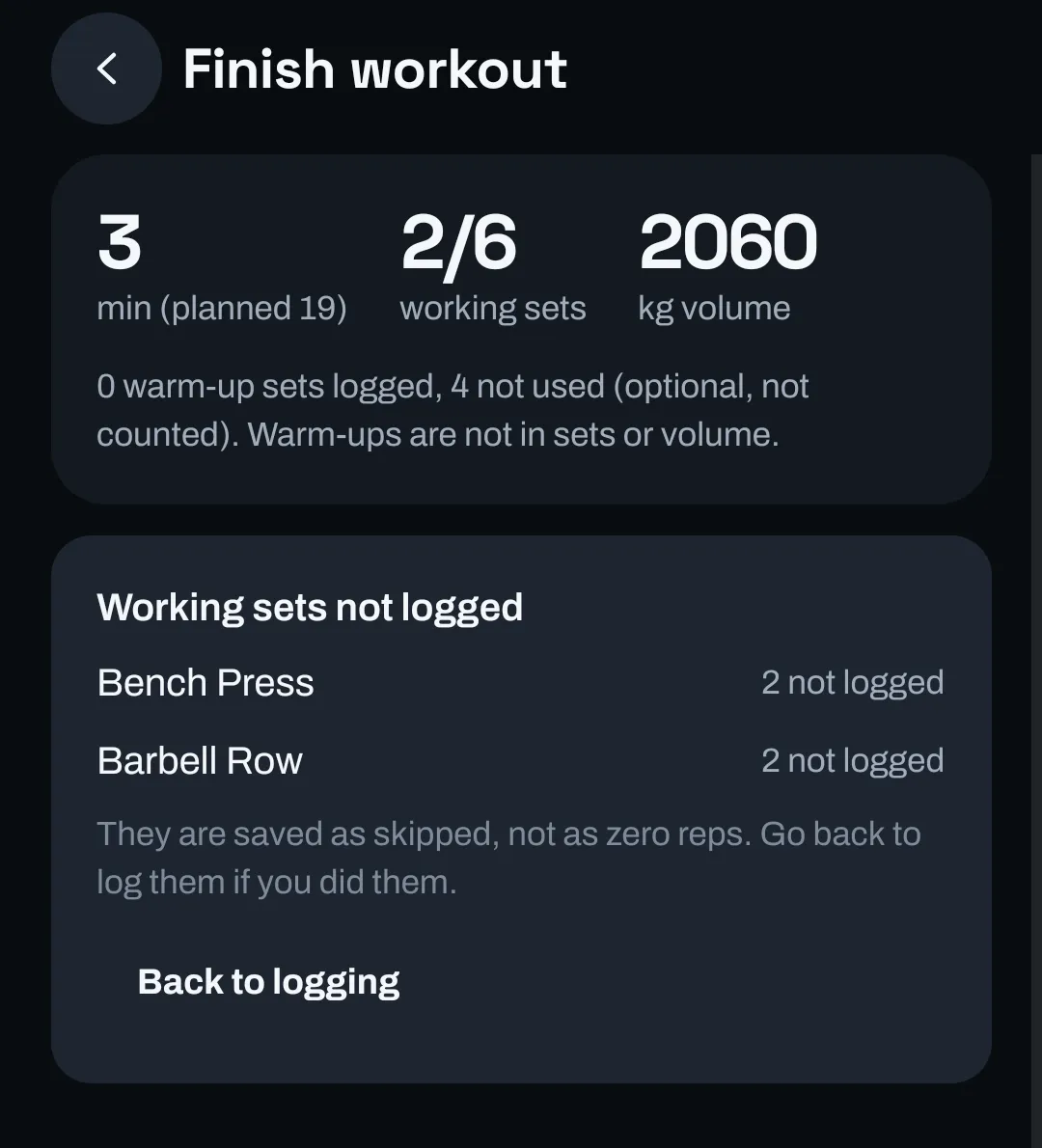
Before saving you see time, working sets and volume, plus any sets you didn’t log. Those are saved as skipped, not as zero reps, so your history and records stay honest. Add a name and how it felt.

The Finish workout review: 3 minutes (planned 19), 2 of 6 working sets, 2060 kg volume, and a Working sets not logged list explaining they are saved as skipped, not as zero reps, with a Back to logging button.
Real screen · development build, sample data

A history you can correct.

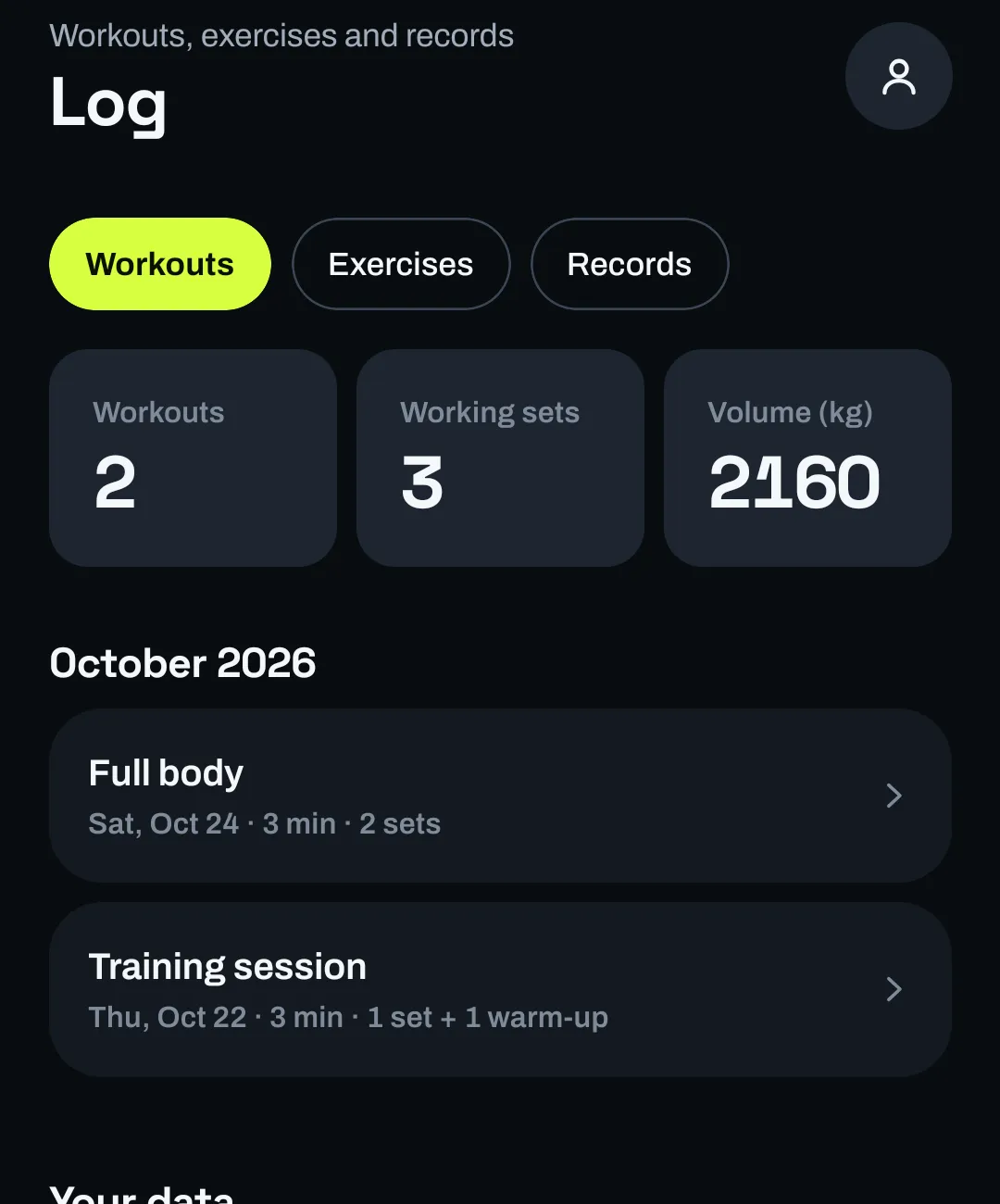
  • Workouts by month, every exercise, and your current records.
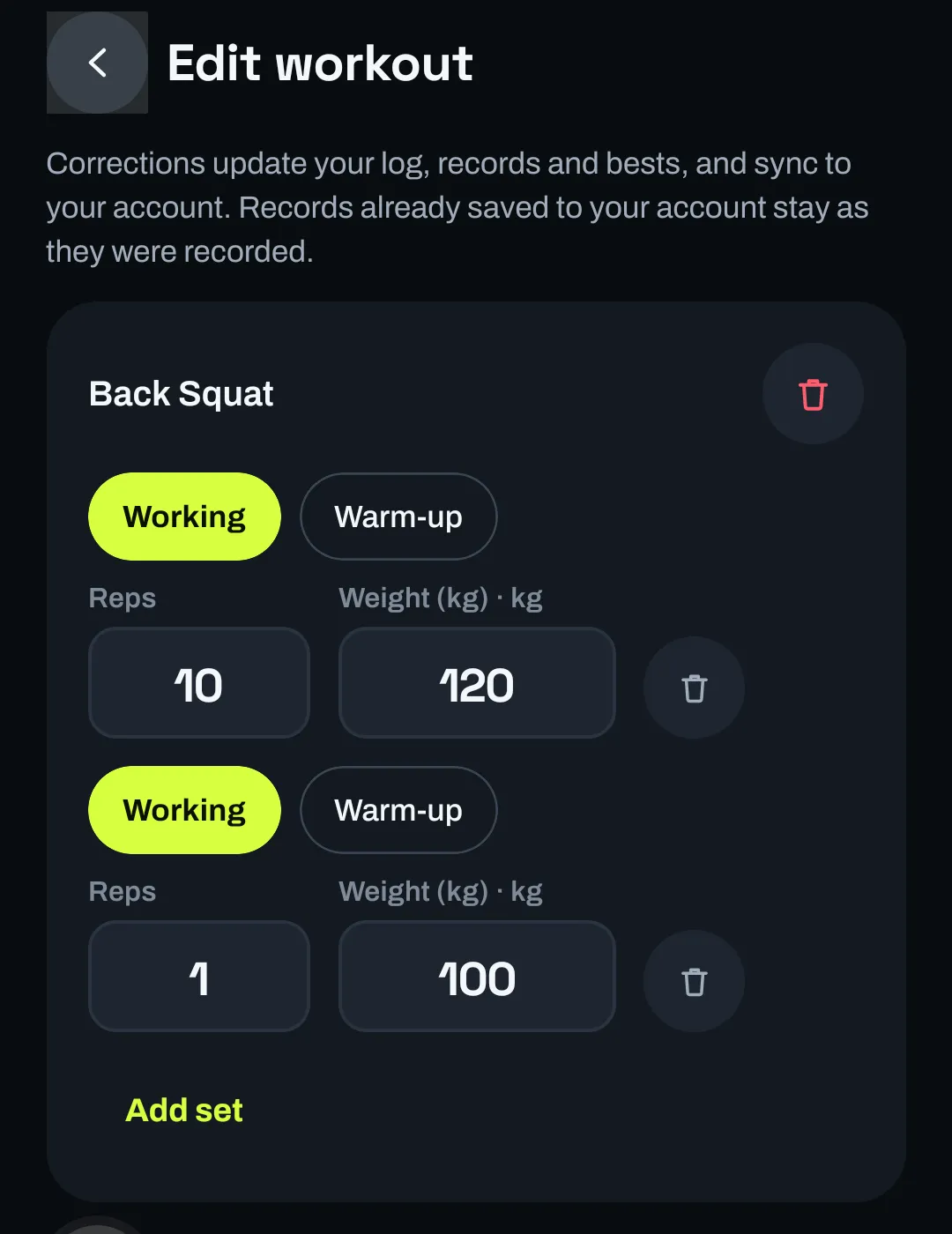
  • Typed 140 instead of 120? Open the workout and fix it. Records, bests and the next plan follow the correction.
  • Export your whole log as a CSV file, one row per set.
The Log tab with Workouts, Exercises and Records filters, totals of 2 workouts, 3 working sets and 2160 kg volume, and the October 2026 workouts listed by date.
Real screen · development build, sample data
The Edit workout screen for a finished session: Back Squat sets marked Working or Warm-up with editable reps and weight (10 × 120 kg and 1 × 100 kg), delete buttons and Add set.

Recovery and what to train next

See what your log says is ready.

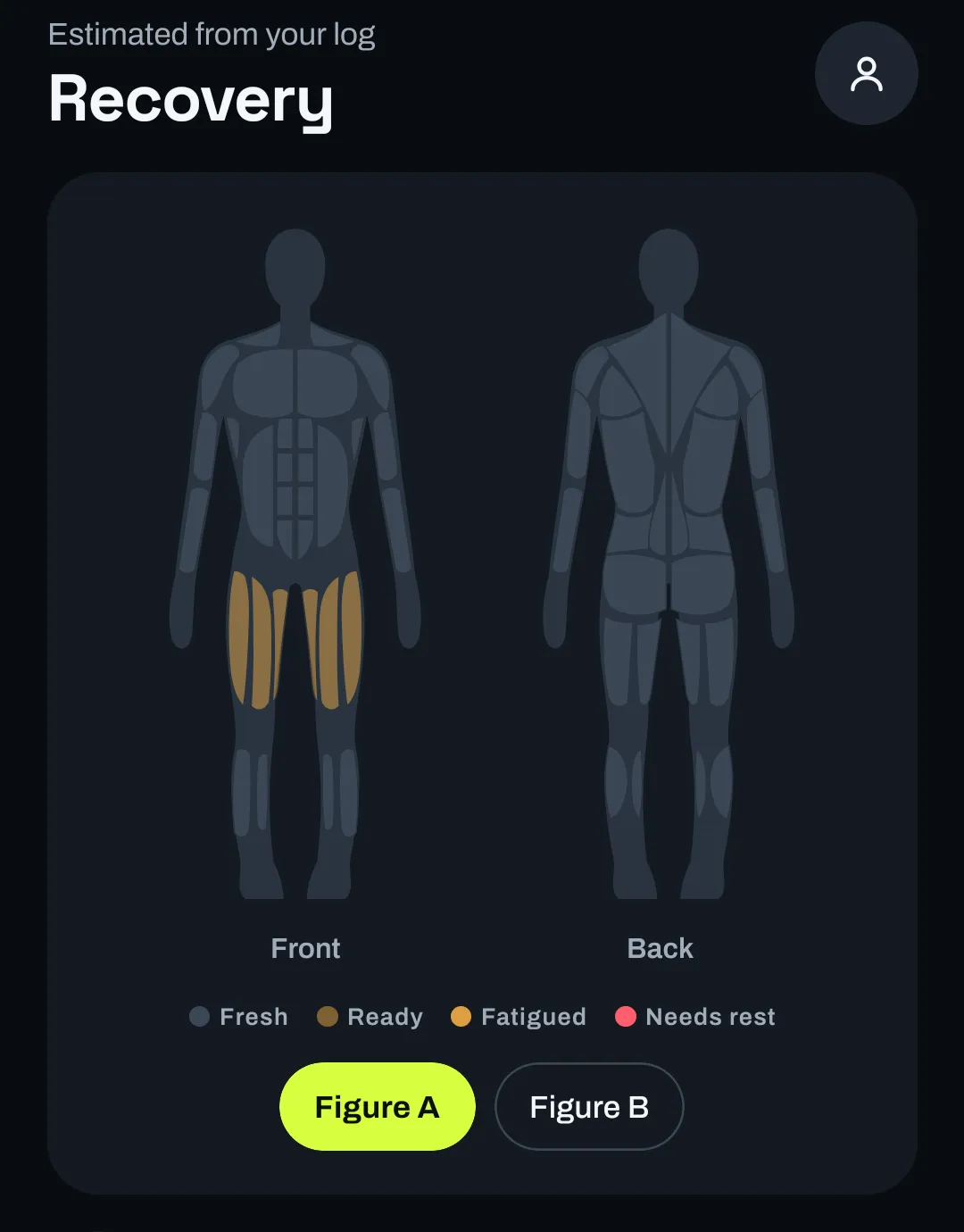
The Recovery tab estimates, muscle by muscle, how recovered you are from the sets you logged and how long ago you did them, from fresh to needs rest. It also shows this week’s working sets per muscle.

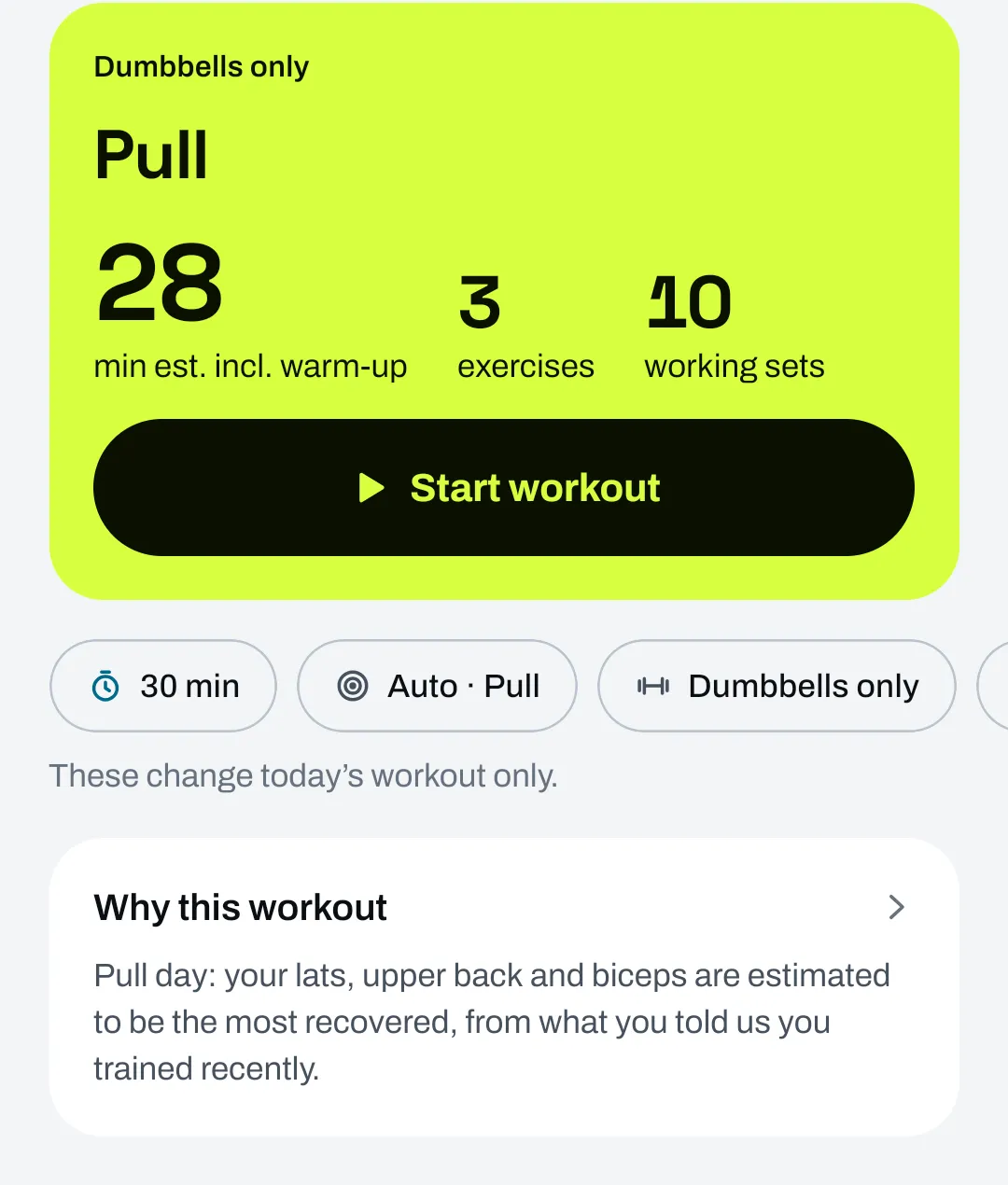
The planner uses that same estimate. With four training days and a recently trained chest, it chose a pull day and said why.

An estimate, not a measurement. It knows only what you log. It can’t tell how you slept or feel, it isn’t medical advice, and it doesn’t prevent injury.

The Recovery tab, estimated from your log: front and back body figures with the quads and glutes shaded, and a legend of Fresh, Ready, Fatigued and Needs rest.
Real screen · development build, sample data
A first workout in the light theme: Dumbbells only, Pull, 28 minutes estimated, 3 exercises, 10 working sets. Why this workout: Pull day, your lats, upper back and biceps are estimated to be the most recovered, from what you told us you trained recently.

Accounts and data

No account needed

Start as a guest. Your setup and workouts stay on that phone.

Optional backup

With an account, the workouts you log are backed up and sync after you go offline. Your training setup stays on the phone for now.

Your data out

Export your log as CSV at any time.

Launch updates

Join the waitlist

Planned for Android and iOS. Leave your email and pick your platform. We’ll email you when it’s ready for you.

No dates, pricing or store listing exist yet, and we won’t guess at any.

  1. Email and platform. Android, iOS or both. Nothing else.
  2. One confirmation email. You’re on the list only after you click its link. Check spam if it doesn’t arrive.
  3. Launch updates only. Every email has an unsubscribe link.
Which phone will you use?

By joining you’re asking for Pacewoven launch updates by email for the platform you choose (Android, iOS or both). We use your email and platform choice only for that. We’ll send one email asking you to confirm; if you don’t confirm, you won’t get updates. Every update email has an unsubscribe link, and you can ask for deletion at pacewoven@gmail.com. A Cloudflare check on this form helps block bots. See the waitlist privacy notice (draft).

Questions

Frequently asked questions

Who is Pacewoven for?

People who lift weights, from new to experienced, who would rather have today’s workout ready than plan it themselves. It suits a commercial gym, a home setup, a pair of dumbbells or no equipment at all.

What equipment do I need?

None in particular. Setup offers Commercial gym, Home gym, Dumbbells only and No equipment, and you can describe your own gyms item by item (barbell, rack, bench, dumbbells, kettlebells, cables, machines, bands, cardio and more). Workouts only use exercises your chosen gym can support.

How does it decide my workout?

With fixed rules on your phone, not AI. It picks the focus from how often you train and which muscles are estimated to be most recovered, chooses exercises that fit your equipment, experience and anything you train around, sets loads from your last sets, and fits the session to the time you choose. Each workout shows a one-line reason.

What can I change?

Before you start: today’s time and gym, replace or add exercises, and stop an exercise being recommended. While training: reps, weight, extra sets and warm-ups. After: open a finished workout to correct sets, reps, weight or set type; your records and the next plan follow the correction.

How is the recovery estimate worked out?

From the sets you log: which muscles they train and how long ago. It is an estimate, not a measurement. It cannot tell how you slept or feel, it is not medical advice, and it does not prevent injury. If something hurts, stop and get it checked.

Do I need an account?

No. You can start as a guest; your setup and workouts stay on that phone. An optional account backs up the workouts you log. Your training setup stays on the phone for now and does not move to another device.

Is it on Android and iPhone?

Pacewoven is planned for Android and iOS. It is in development and not in any app store yet. Development and testing so far have been on Android; the iOS version has not been built yet.

When does it launch, and what will it cost?

There is no release date or price yet, and we won’t guess at either. This site will link to a store listing only when a real one exists.

What does joining the waitlist mean?

You leave your email and choose Android, iOS or both. We send one confirmation email; you are on the list only after you click its link. After that we email you about Pacewoven’s launch for the platform you chose. Every email has an unsubscribe link, and you can ask for deletion at any time. It does not create an app account.